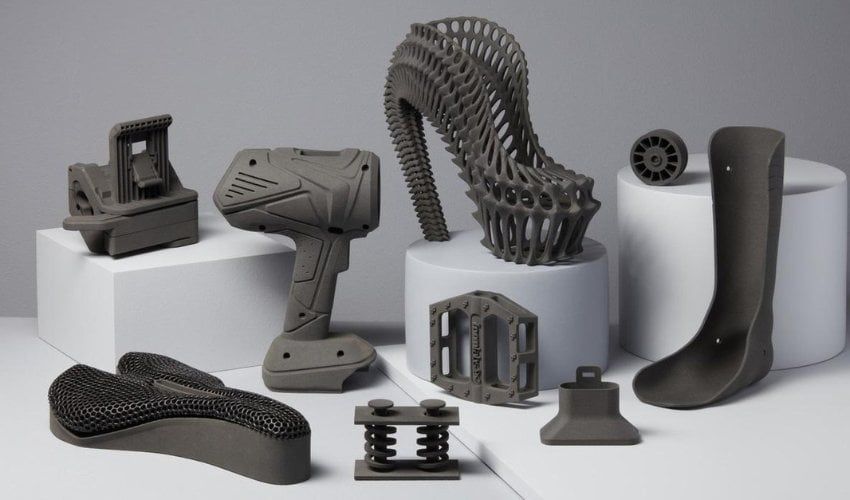
The designer's maker lab: CAD, 3D printing, and woodworking
Why every designer should build a maker lab—Fusion 360, 3D printing, and woodworking teach physical constraints and instincts that sharpen digital work.
There’s a reason Dieter Rams kept a workshop and Jony Ive spent hours in the model shop at Apple. The designers we admire most—the ones who produced objects that feel inevitable—could grab, hold, and turn the thing they were designing. They understood radius and mass and surface finish not as abstract values in a spec, but as physical facts you feel in your hand. That connection between the designer and the material world is something screen-based work has quietly eroded, and reclaiming it is one of the most rewarding things I’ve done. The moment I started designing objects in Fusion 360, printing them, sanding them, and holding the result, my digital design work got sharper too. Constraints stopped being theoretical. Tolerances stopped being someone else’s problem.
Why physical making sharpens digital design thinking
The argument for physical making as a design practice isn’t nostalgic—it’s practical. Physical materials impose constraints that screens don’t. When you design a digital interface, you can defer many decisions: edge cases can be “handled later,” content overflow can be “design should handle that,” performance constraints can be “let engineering figure it out.” Physical materials don’t allow deferral. A part that won’t survive the stress it will be under is just a bad part. A joint that won’t hold is a joint that won’t hold.
This immediacy builds a quality of design thinking that’s difficult to develop through screen-only work. Designers who have worked with physical materials develop a different relationship to constraints—not as obstacles to route around, but as the primary data that shapes the design. Constraints first, aesthetics second. This is how Dieter Rams approached product design. It’s how the best physical products are made. And it transfers directly.
The specific benefits I’ve observed in my own work:
- Dimensional thinking. Working in CAD where every dimension is specified and every relationship is parametric builds precision in how I think about layout grids, spacing systems, and component sizing in Figma. The discipline of exact specification stops feeling onerous and starts feeling like craft.
- Constraint-first design. Before I design anything physical, I ask: what are the manufacturing constraints? What are the material constraints? What are the functional requirements? This habit has carried directly into how I approach digital product design briefs.
- Iteration tolerance. In physical making, a failed print or a miscut board is information, not a setback. This relationship to failure—where failure is expected, useful, and fast—has changed how I run design explorations.
Building a maker lab at home: the practical starting point
The barrier to entry for a home maker lab has dropped dramatically in the past decade. The tools are cheaper, more reliable, and better-documented than they’ve ever been.
The 3D printer. A capable FDM printer costs $200–$600. The Bambu Lab A1 Mini is the recommendation for designers who want something that “just works”—it’s fast, accurate, and has an excellent slicer (Bambu Studio). The Prusa MK4 is the recommendation for designers who want to understand every aspect of how the printer works. Both are capable of production-quality results. The materials to start with: PLA for most objects, PETG for anything that needs to be tougher or slightly heat-resistant.
Fusion 360. Free for personal use and arguably the best parametric CAD environment available. The learning curve is real—expect two to three weekends of deliberate learning before models feel natural—but the payoff is immediate. The parametric modeling paradigm (sketch → constrain → extrude, with a timeline of operations) transfers directly to the systems thinking that design requires. Start with Fusion 360’s own tutorial series, then Kevin Kennedy’s “Product Design Online” YouTube channel for practical project-based learning.
The slicer. The slicer is the software that converts your CAD model (STL or 3MF file) into the toolpath instructions the printer follows. Bambu Studio, PrusaSlicer, and OrcaSlicer are all excellent and free. The slicer is where you specify print settings—layer height, infill percentage, support structures, first layer calibration. Understanding the slicer is understanding what the printer is actually doing, which is essential for designing printable parts.
Hand tools. The most underrated part of a maker lab. A good set of hand tools—chisels, hand plane, marking gauge, saws—allows you to work with wood at a scale and intimacy that power tools don’t. Hand tool woodworking is slow by design. You can’t rush a hand-cut mortise. This enforced pace is pedagogically valuable: you learn grain direction, wood behavior, edge geometry, and finishing through the slowness of the process.
Why Raspberry Pi belongs in a designer’s toolkit
The Raspberry Pi is a small single-board computer that runs Linux on hardware small enough to hold in one hand. For designers, it’s a two-way design tool: you design the software that runs on it and the physical enclosure that houses it.
The Raspberry Pi project that taught me the most was a home automation controller I built from scratch. The software side: a small Python application that reads sensor data and controls relays. The hardware side: a custom enclosure designed in Fusion 360, printed in PETG, with ventilation slots sized for the thermal output of the board and cutouts for the connectors sized to 0.1mm precision. Getting both sides right required thinking across the full stack—software behavior, hardware constraints, thermal management, assembly sequence, aesthetic finish.
This is what “design engineering” means in practice: designing across the full stack without handing off between disciplines. The Raspberry Pi is one of the best tools for practicing it because it’s accessible, well-documented, and produces a physical artifact you can hold and use.
Good starting projects for a designer’s first Raspberry Pi build:
- A custom case for a Raspberry Pi Zero 2 W — introduces measurement, fitting, and enclosure design in Fusion 360
- A small home dashboard displaying weather, calendar, or sensor data — introduces Python, APIs, and simple web interfaces
- A network-wide ad blocker (Pi-hole) — introduces DNS, networking, and system administration basics
- A retro gaming console — introduces operating system configuration and peripheral integration
For a real build in this spirit, see my garden note on hacking a Kindle Paperwhite into a family dashboard—weather, calendars, and countdowns on e-ink, with a 3D printed fridge mount.
Woodworking as a design education
Woodworking is the maker practice that’s aged the least. Every principle that applies to good woodworking—grain direction, joinery, fitting, finishing—was relevant five hundred years ago and is relevant now. The materials and tools have evolved; the design thinking hasn’t.
Grain direction is the concept that transforms a carpenter into someone who understands material. Wood is anisotropic: its strength, stiffness, and shrinkage behavior are dramatically different along the grain versus across it. A joint that fails in tension across the grain will hold indefinitely along it. A panel that’s flat today will cup tomorrow if you ignore how it was cut from the log. Designing with grain direction is designing with the material’s natural behavior, not against it.
Joinery is constraint design. A mortise-and-tenon joint works because the geometry of the joint mechanically constrains the parts to resist the specific loads they’ll experience. A dovetail works because the interlocking angled geometry resists tension. Every joint is a solution to a specific loading problem. Designing joints teaches you to think about loads, constraints, and material behavior simultaneously—the same triple constraint that defines good structural design in any domain.
The finishing process teaches patience and iteration. Good furniture finishing requires multiple rounds of surface preparation, sealing, sanding, and topcoat. Rushing any stage produces visible defects in the final surface. This patience—doing each stage correctly before moving to the next—is a discipline that carries into digital design. The temptation to skip surface preparation and go straight to the finish coat is the same temptation to skip user research and go straight to high-fidelity mockups.
How do you get started without a full workshop?
You don’t need a full workshop to start. The minimum viable maker setup for a designer is:
- A 3D printer and a laptop with Fusion 360 installed
- A small set of hand tools: a block plane, a marking gauge, a chisel set, a pull saw
- A workbench surface (a folding table works)
- Safety equipment: eye protection, hearing protection for any power tools, dust masks for sanding and finishing
This setup fits in a spare bedroom, a corner of a garage, or even a large closet. The 3D printer runs quietly and can be in a living space. Hand tools produce minimal noise and no dust.
The first project should be something you need. Design a cable management solution for your desk. Build a small shelf for your workspace. Design a phone stand for your desk. The motivation of designing something useful keeps the learning momentum going when the technical challenges are frustrating.
For more on the digital-to-physical arc—AI-assisted concepts, material tradeoffs, and fabrication mindset—digital fabrication: AI concepts, materials, and fabrication mindset goes deeper on that thread. For the product-design payoff specifically—why 3D printing sharpens digital design instincts—see from Figma to filament: why I 3D print as a product designer, and for how making fits a broader hybrid practice, the design engineer: code, 3D printing, and hybrid design practice.
Key Takeaways
- Physical making sharpens digital design by imposing immediate, unavoidable constraints—tolerances, material behavior, structural loads—that screen-based design allows you to defer indefinitely
- A capable maker lab setup costs $200–$600 for a 3D printer, nothing for Fusion 360 (free for personal use), and $50–$150 for a basic hand tool set
- Raspberry Pi projects that span software and hardware are among the best design engineering exercises available: you design across the full stack and hold the result
- Woodworking teaches grain direction, joinery as constraint design, and the patience of correct process sequence—all of which transfer to digital design practice
- Start with a project you need: a cable clip, a desk organizer, a small shelf. The motivation of designing something useful is what sustains the learning through the technical challenges